Formats
convert picks the format from the file's first bytes and its extension. For bytes, you name it: format="docx".
Documents
| Format | Extensions | Out |
|---|---|---|
| Word | .docx |
Headings, paragraphs, bold/italic, lists, tables, links, images, comments |
| PowerPoint | .pptx |
One ## Slide N per slide, tables, speaker notes, images, comments |
| Excel | .xlsx .xls |
One ## Sheet per sheet, as a table |
.pdf |
Every page, in reading order. Not native — needs anytomd[pdf] |
Web and data
| Format | Extensions | Out |
|---|---|---|
| HTML | .html .htm |
Headings, tables, lists, links, code blocks; <title> becomes document.title |
| CSV | .csv |
One table |
| Jupyter | .ipynb |
Markdown cells as-is, code cells fenced |
| JSON | .json |
Pretty-printed, fenced |
| XML | .xml |
Pretty-printed, fenced |
Text and code
| Format | Extensions | Out |
|---|---|---|
| Text | .txt .md .rst .log .yaml .toml .ini … |
As-is; UTF-8, UTF-16 and Windows-1252 detected |
| Code | .py .rs .js .ts .go .java .c … |
Fenced, with its language |
Images
.png .jpg .gif .webp .bmp .tiff .svg .heic .avif, alone or inside a DOCX, PPTX or XLSX.
| Installed | An image with text | An image without text |
|---|---|---|
| nothing |  |
 |
[ocr] |
its text | "" |
[ocr] + [vlm] |
its text | Image description: A red square on white. |
[vlm] only |
Image description: … |
Image description: … |
OCR always goes first: it is local, free and exact. The vision model is asked only when OCR finds no letters, and its answer is always labeled Image description:, so you can tell it from text that was really in the image.
import anytomd as ad

ad.convert("invoice.png").markdown   # e.g. 'Invoice 2026\nAmount due: 1.240,00 EUR'
ad.convert("cat.png").markdown       # e.g. 'Image description: A tabby cat asleep on a wooden chair.'
Inside documents, the same rule fills each image's alt text, on one line:


When neither finds anything, the author's own alt text stays: .
Vision needs a model → VisionSpec. Turn OCR off with ocr=False.
PDF
The engine leaves PDF out on purpose: LLMs read it natively. To convert it here:
Text layers are read directly; scanned pages go through OCR (ocr=False skips it). Without the extra:
Text recovery
Every supported format is generated from one and the same 103-word passage, then converted back and scored on how many of those words come out. It is a comparison between formats, not an absolute benchmark: the passage is fixed and committed, so the bars show where each format's text lands relative to the others.
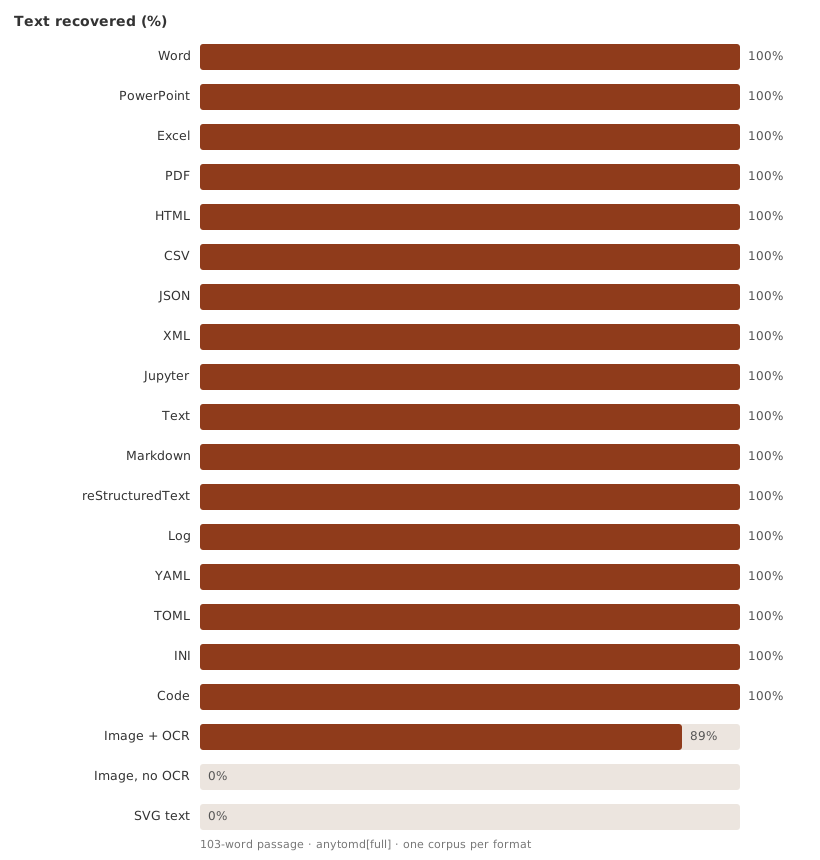
Text and structured formats recover the passage in full. The gap is the OCR row: a rendered image is read back through
the OCR engine, and some words survive imperfectly. The SVG row is zero — the engine treats an image as pixels and does
not read vector <text>, so nothing comes back until the binding can rasterize it.
The measurement lives in tools/fidelity.py; docs/fidelity.json is the committed baseline. Re-run and compare with:
make fidelity            # re-measure, fail on any regression against the baseline
make fidelity ARGS=--update   # rewrite the baseline and the chart
Not supported
Plain ZIP archives, EPUB, binaries → UnknownFormatError.